
Devices: sources
Every voltage source has a + and a - pin and forces V(+) - V(-). Every current source drives its current out of the + pin into the circuit and back in at -. A source delivering power shows a negative current at its + pin, because pin currents are measured into the part.
31.1Changing the source type
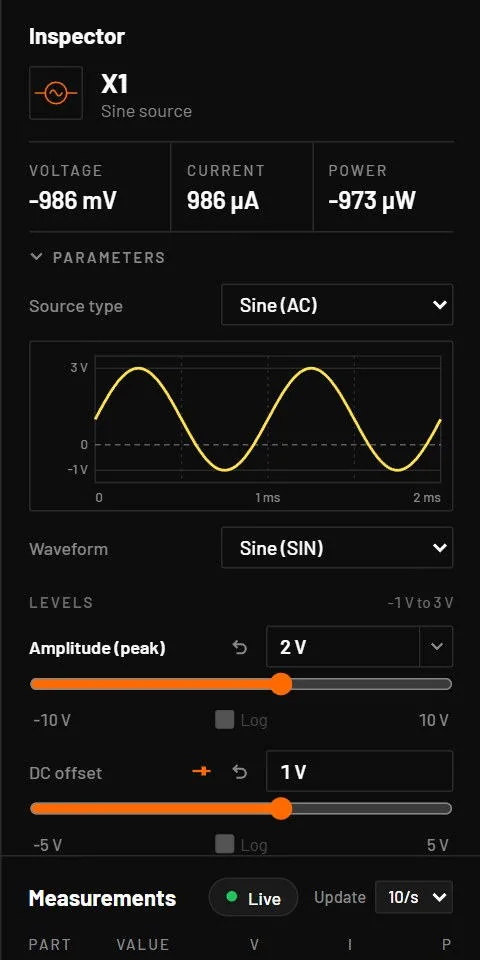
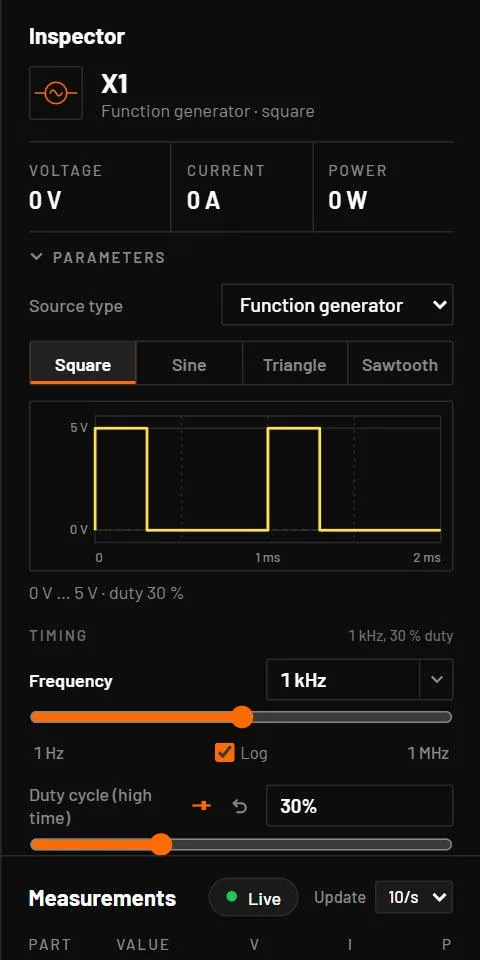
The inspector's Source type list turns a source into another kind in place, keeping its pins and wires: DC voltage, Sine (AC), Square, Function generator, Pulse, PWL, Battery, DC current, Sine current, Function generator current. Levels and frequency carry over as far as the new waveform allows. Every source shows a live preview of its waveform. A battery keeps its chemistry and never gets pinned to a made-up voltage.
31.2How sources behave in each analysis
| Analysis | Behaviour |
|---|---|
| Operating point | The value at t = 0: sine = offset + amp · sin(phase), pulse = low level, PWL = first point. |
| Transient | The full waveform. Pulse, square, function generator and PWL corners are exact breakpoints, so edges are never skipped. A sine limits the timestep to a twentieth of its period. |
| AC sweep | The source chosen as input gets 1 V (or 1 A) at 0°, whatever its own parameters. Other sources are at their DC value. |
| DC sweep | The swept source becomes a DC value. For a sine, the offset is swept. A battery cannot be swept. |
31.3DC voltage source
| Type | Key | Pins | Variants | Class |
|---|---|---|---|---|
vdc (V) | V | +, - | none | exact |
| Parameter | Key | Unit | Default | Range | Value comes from | What it does |
|---|---|---|---|---|---|---|
| Voltage | v | V | 5 | any. Slider -50 to 50 V. | Default, inspector, board import | V(+) - V(-). |
| Series resistance | rs | Ω | 0 | ≥ 0 | Default, inspector | A real source: a resistor in the + lead. A battery keeps its own r. |
| AC magnitude, phase | ac_mag, ac_phase | V, ° | 1, 0 | any | Default, inspector | The drive when this is the source an AC analysis sweeps. Noise, loop gain and pole-zero ignore them, as ngspice does. |
Key: the name in the circuit file, in a parameter step (R1.r) and for AI agents. Range: a value outside it is refused with E_PARAM. Value comes from: where you can set it. The All parameters tab and agents can set every parameter.
Two voltage sources in parallel, or one shorted, are refused before the run (E_VSRC_LOOP, E_VSRC_SHORT).
31.4Sine source
| Type | Key | Pins | Variants | Class |
|---|---|---|---|---|
vsin (V) | A | +, - | none | exact |
v(t) = offset + amp · sin(2π · freq · t + phase).
| Parameter | Key | Unit | Default | Range | Value comes from | What it does |
|---|---|---|---|---|---|---|
| Amplitude (peak) | amp | V | 5 | any. Slider 0 to 400 V. | Default, inspector | Peak, not peak to peak or RMS. 230 V RMS mains is 325 V peak. |
| Frequency | freq | Hz | 50 | 0 to 1015. Slider 0.1 Hz to 10 MHz. | Default, inspector | |
| Damping | theta | 1/s | 0 | any | Default, inspector | Amplitude × exp(-theta (t - delay)), as the SPICE SIN source. |
| DC offset | offset | V | 0 | any | Default, inspector | |
| Phase | phase | ° | 0 | any | Default, inspector | |
| Start delay | delay | s | 0 | ≥ 0 | Default, inspector | The source holds its starting value (offset + amp · sin(phase)) until then, with no jump. Like SIN TD in SPICE. |
Key: the name in the circuit file, in a parameter step (R1.r) and for AI agents. Range: a value outside it is refused with E_PARAM. Value comes from: where you can set it. The All parameters tab and agents can set every parameter.
31.5Pulse source
| Type | Key | Pins | Variants | Class |
|---|---|---|---|---|
vpulse (V) | Alt+A | +, - | none | exact |
The SPICE pulse: low, a linear rise, high for the width, a linear fall, low until the end of the period.
| Parameter | Key | Unit | Default | Range | Value comes from | What it does |
|---|---|---|---|---|---|---|
| Low (initial) | v1 | V | 0 | any | Default, inspector | Level before the delay and between pulses. |
| High (pulsed) | v2 | V | 5 | any | Default, inspector | |
| Start delay | delay | s | 0 | ≥ 0 | Default, inspector | Time before the first rising edge. |
| Rise time | rise | s | 1 ns | ≥ 0 (used ≥ 1 ps) | Default, inspector | |
| Fall time | fall | s | 1 ns | ≥ 0 (used ≥ 1 ps) | Default, inspector | |
| Pulse width | width | s | 5 µs | ≥ 0 | Default, inspector | Time at the high level between the end of the rise and the start of the fall. |
| Period | period | s | 10 µs | ≥ 1 fs | Default, inspector | If rise + width + fall is longer, the pulse is cut at the period and the run warns W_PARAM. |
Key: the name in the circuit file, in a parameter step (R1.r) and for AI agents. Range: a value outside it is refused with E_PARAM. Value comes from: where you can set it. The All parameters tab and agents can set every parameter.
For a PWM signal of duty D at the 50 % level, set width = D · period - (rise + fall) / 2.
A pulse that doesn’t fit in its period is cut off when the next period starts, so it never settles back to the low level. The run says so with a W_PARAM warning that names the numbers and the fix: "V2: rise 1 µs + width 9 µs + fall 1 µs = 11 µs is longer than the period 10 µs; each pulse is cut off when the next period starts …", then "Make V2 width at most 8 µs (period − rise − fall), or the period at least 11 µs." When the two edges alone are longer than the period, the fix says to shorten them. A negative delay, rise, fall or width is still an E_PARAM error that names the key and >= 0.
31.6Square wave source
| Type | Key | Pins | Variants | Class |
|---|---|---|---|---|
vsquare (V) | library | +, - | none | approximate |
A square wave with fixed edges of 1 ns or a thousandth of the period, whichever is shorter, and an optional start delay. For phase or slow edges use the function generator.
| Parameter | Key | Unit | Default | Range | Value comes from | What it does |
|---|---|---|---|---|---|---|
| Low level | vlo | V | 0 | any | Default, inspector | |
| High level | vhi | V | 5 | any | Default, inspector | |
| Frequency | freq | Hz | 1 kHz | > 0 | Default, inspector | |
| Duty cycle | duty | % (stored 0 to 1) | 50 % | 0 to 1 | Default, inspector | High time at the 50 % level. |
| Start delay | delay | s | 0 | ≥ 0 | Default, inspector | The output stays low until then. |
Key: the name in the circuit file, in a parameter step (R1.r) and for AI agents. Range: a value outside it is refused with E_PARAM. Value comes from: where you can set it. The All parameters tab and agents can set every parameter.
31.7Function generator
| Type | Key | Pins | Variants | Class |
|---|---|---|---|---|
vfunc (V) | library | +, - | square, sine, triangle, sawtooth (the waveform) | approximate |
A bench function generator. The variant is the waveform, chosen with the Square, Sine, Triangle and Sawtooth buttons. The current version, ifunc, is the same with ipp in amps (default 2 mA, centred).
| Parameter | Key | Unit | Default | Range | Value comes from | What it does |
|---|---|---|---|---|---|---|
| Frequency | freq | Hz | 1 kHz | > 0 | Default, inspector | |
| Amplitude (peak to peak) | vpp | V | 5 | any (magnitude used) | Default, inspector | |
| Levels | levels | From 0 | From 0, Centred on 0, Custom offset | Default, inspector | Presets for the offset. From 0: 0 to vpp. Centred: ± vpp/2. Custom: around the DC offset you typed. | |
| DC offset (mid level) | offset | V | 0 | any | Default, inspector | Always shown, with the mid level the waveform has now (2.5 V for 5 Vpp from 0). Typing a value sets Levels to Custom offset: 1 V offsets the wave by 1 V. |
| Duty cycle / Symmetry | duty | % (stored 0 to 1) | 50 % | 0 to 1 | Default, inspector | Square: high time. Triangle: the rising fraction. Not used by sine and sawtooth. |
| Rise time | rise | s | 1 ns | ≥ 0 (up to 45 % of the period) | Default, inspector | Square edges. |
| Fall time | fall | s | 1 ns (sawtooth: period / 1000) | ≥ 0 | Default, inspector | Square falling edge, or the sawtooth flyback. |
| Phase | phase | ° | 0 | any | Default, inspector | A positive phase advances the waveform. |
| Start delay | delay | s | 0 | ≥ 0 | Default, inspector | Every waveform, the sine too, holds its starting level until then and then starts its first period. |
Key: the name in the circuit file, in a parameter step (R1.r) and for AI agents. Range: a value outside it is refused with E_PARAM. Value comes from: where you can set it. The All parameters tab and agents can set every parameter.
31.8Piecewise-linear source
| Type | Key | Pins | Variants | Class |
|---|---|---|---|---|
vpwl (V) | library | +, - | none | exact |
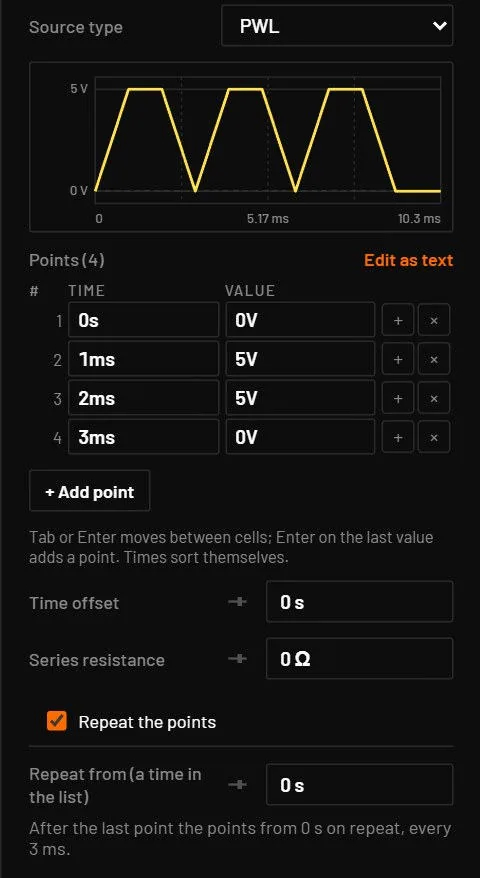
Straight lines between time and value points. Before the first point the first value holds, after the last the last value holds. Two points at the same time make a step. The points are sorted by time. The inspector shows them as a table, under a preview of the waveform.
| In the table | What it does |
|---|---|
| A cell | Type a time or a value, with units such as 1ms or 5V. Enter or Tab applies, Esc puts the stored value back. |
| + | Adds a point after the last one. |
| × on a row | Deletes the point. At least one point stays. |
| Edit as text | The same points as text, one per line (1ms 5V) or separated by commas (0 0, 1m 5, 2m 5, 3m 0). Press Ctrl+Enter or click away to apply. |
| Right-click the source, Edit points… | Opens the inspector with the first cell of the table selected. |
Undo, and an AI agent’s edits, show in the table at once.
Under the table, Time offset starts the whole list later (the first value holds until then), and Repeat the points plays the list again and again, like td= and r= in a SPICE PWL source. Ticking the box sets Repeat from to the first time, so the whole list repeats. Raise it to repeat only the later part: with Repeat from at 1 ms, a list that ends at 3 ms plays once from the start, and from then on the section from 1 ms to 3 ms repeats every 2 ms. The note under the field says what repeats and how often, for example "After the last point the points from 0 s on repeat, every 2 ms." Each pass jumps back to the value at the repeat time, and the corners of every pass are exact breakpoints. A repeat time that isn’t before the last point is a mistake: the points play once and the run warns W_PARAM.
| Parameter | Key | Unit | Default | Range | Value comes from | What it does |
|---|---|---|---|---|---|---|
| Points | points | s, V | [[0, 0]] (placed: 0 V, then 5 V at 1 ms) | times rising from 0 | Default, inspector | A list of [time, value] pairs in the file. |
| Time offset | td | s | 0 | any | Default, inspector | Shifts the whole list later. The first value holds until then. Its slider spans the length of the list. |
| Repeat from | r | s | none (plays once) | ≥ 0, before the last point | Default, inspector | A time in the list. After the last point, the section from r to the last point repeats forever. 0 repeats the whole list. Unticking Repeat the points removes it. Exported as r= and td=. |
Key: the name in the circuit file, in a parameter step (R1.r) and for AI agents. Range: a value outside it is refused with E_PARAM. Value comes from: where you can set it. The All parameters tab and agents can set every parameter.
31.9DC current source
| Type | Key | Pins | Variants | Class |
|---|---|---|---|---|
idc (I) | I | +, - | none | exact |
| Parameter | Key | Unit | Default | Range | Value comes from | What it does |
|---|---|---|---|---|---|---|
| Current | i | A | 1 mA | any. Slider -10 to 10 A. | Default, inspector | Leaves the + pin into the circuit. |
| Parallel resistance | rp | Ω | none | > 0 | Default, inspector | A real source: a resistor across its output. |
Key: the name in the circuit file, in a parameter step (R1.r) and for AI agents. Range: a value outside it is refused with E_PARAM. Value comes from: where you can set it. The All parameters tab and agents can set every parameter.
A current source with nowhere to send its current is refused (E_ISRC_OPEN).
31.10Sine current source
| Type | Key | Pins | Variants | Class |
|---|---|---|---|---|
isin (I) | library | +, - | none | exact |
| Parameter | Key | Unit | Default | Range | Value comes from | What it does |
|---|---|---|---|---|---|---|
| Amplitude | amp | A | 1 mA | any | Default, inspector | Peak. |
| Frequency | freq | Hz | 50 | 0 to 1015 | Default, inspector | |
| Offset | offset | A | 0 | any | Default, inspector | |
| Phase | phase | ° | 0 | any | Default, inspector | |
| Start delay | delay | s | 0 | ≥ 0 | Default, inspector | As for the sine voltage source. |
Key: the name in the circuit file, in a parameter step (R1.r) and for AI agents. Range: a value outside it is refused with E_PARAM. Value comes from: where you can set it. The All parameters tab and agents can set every parameter.
31.11Voltage-controlled voltage source (E)
| Type | Key | Pins | Variants | Class |
|---|---|---|---|---|
vcvs (E) | library | +, -, c+, c- | none | exact |
V(+) - V(-) = gain · (V(c+) - V(c-)). The control pins draw no current.
| Parameter | Key | Unit | Default | Range | Value comes from | What it does |
|---|---|---|---|---|---|---|
| Gain | gain | V/V | 1 | any. Slider -1000 to 1000. | Default, inspector |
Key: the name in the circuit file, in a parameter step (R1.r) and for AI agents. Range: a value outside it is refused with E_PARAM. Value comes from: where you can set it. The All parameters tab and agents can set every parameter.
31.12Voltage-controlled current source (G)
| Type | Key | Pins | Variants | Class |
|---|---|---|---|---|
vccs (G) | library | +, -, c+, c- | none | exact |
A current gm · (V(c+) - V(c-)) flows from + through the part to -. The control pins draw no current.
| Parameter | Key | Unit | Default | Range | Value comes from | What it does |
|---|---|---|---|---|---|---|
| Transconductance | gm | S | 1 mS | any | Default, inspector |
Key: the name in the circuit file, in a parameter step (R1.r) and for AI agents. Range: a value outside it is refused with E_PARAM. Value comes from: where you can set it. The All parameters tab and agents can set every parameter.
For a source controlled by a current, use the CCVS or CCCS below.
31.13Current-controlled voltage source (H)
| Type | Key | Pins | Variants | Class |
|---|---|---|---|---|
ccvs (H) | library | +, -, s+, s- | none | exact |
V(+) - V(-) = rt · I(sense), where I(sense) is the current that flows into s+ and out of s-. The sense port is a 0 V branch, an ideal ammeter: wire it in series with the branch whose current you want to sense, the way you put a meter in a line. A positive current goes into s+. Swap the two pins to reverse the sign. The port needs no extra 0 V source in the schematic.
| Parameter | Key | Unit | Default | Range | Value comes from | What it does |
|---|---|---|---|---|---|---|
| Transresistance | rt | Ω | 1 kΩ | any. Slider -1 MΩ to 1 MΩ. | Default, inspector | Volts out per amp sensed. A sensed 5 mA with rt = 200 Ω gives 1.000 V. |
Key: the name in the circuit file, in a parameter step (R1.r) and for AI agents. Range: a value outside it is refused with E_PARAM. Value comes from: where you can set it. The All parameters tab and agents can set every parameter.
Live value: Sensed current (i_sense), and every pin shows its current. The exported SPICE netlist has an H element with a 0 V source for the sense port.
31.14Current-controlled current source (F)
| Type | Key | Pins | Variants | Class |
|---|---|---|---|---|
cccs (F) | library | +, -, s+, s- | none | exact |
A current gain · I(sense) flows into + and out of - through the source, as for the VCCS. I(sense) is the current into s+ and out of s-, through the same 0 V sense port as the CCVS. A source may sense the branch it feeds: a gain of 0.5 on its own load current is allowed, and settles at the current the equations give.
| Parameter | Key | Unit | Default | Range | Value comes from | What it does |
|---|---|---|---|---|---|---|
| Current gain | gain | A/A | 1 | any. Slider -1000 to 1000. | Default, inspector | Amps out per amp sensed. A sensed 5 mA with a gain of 3 gives 15 mA. |
Key: the name in the circuit file, in a parameter step (R1.r) and for AI agents. Range: a value outside it is refused with E_PARAM. Value comes from: where you can set it. The All parameters tab and agents can set every parameter.
Live value: Sensed current (i_sense). Both are linear and exact, like the VCVS and VCCS, and a change of the field applies while the circuit runs.
Start delay sliders (the delay of the sine, square, pulse and function generator sources, and the PWL Time offset) span one period of the source, from 0 to 1 / frequency, so a slider on a 100 kHz source runs from 0 to 10 µs instead of 0 to 1 s. A source with a delay that is already longer than one period gets a slider that spans two or more periods. A range you typed yourself wins.
31.15Battery
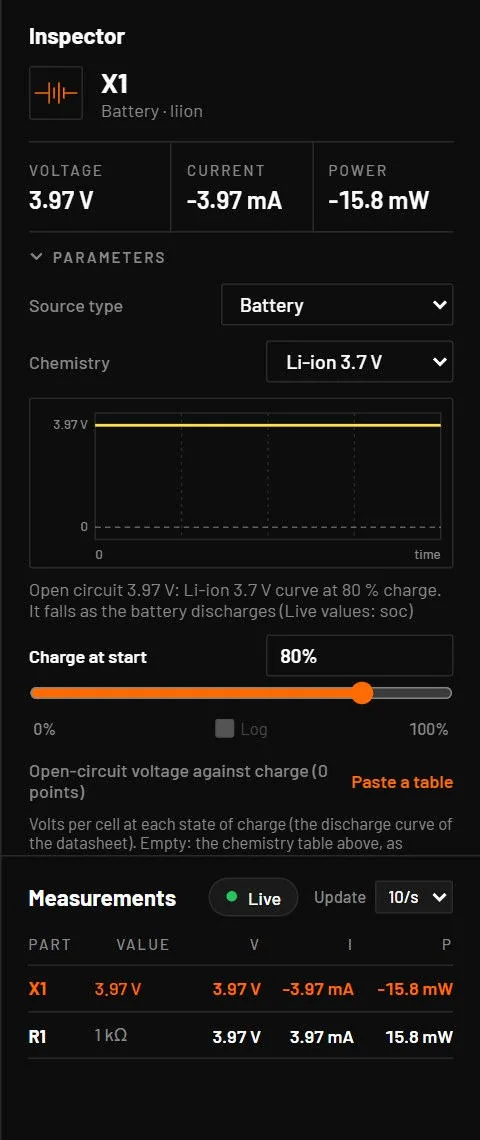
The inspector of a battery shows its Chemistry (Li-ion, LiFePO4, NiMH, alkaline, coin, lead-acid, LiPo pack), a graph of the open-circuit voltage, and the fields below. The open-circuit voltage is the one the chemistry’s curve gives at the charge you set, so the inspector, the preview, the canvas label and the simulation agree: a NiMH cell reads 1.30 V, not 3.7 V. The full model is in Batteries and supercapacitors.
| Parameter | Key | Unit | Default | Range | Value comes from | What it does |
|---|---|---|---|---|---|---|
| Chemistry | variant | liion | liion, lifepo4, nimh, alkaline, coin, leadacid, lipo_pack | Default, inspector | Picks the voltage curve, resistance and polarisation. | |
| Charge at start | soc | 0 to 1 | 0.8 | Default, inspector | Shown as a percentage. Falls as the battery delivers charge. | |
| Cells in series | cells | 1 (LiPo pack 3) | whole number, 1 or more | Default, inspector | ||
| Capacity | capacity_ah | Ah | 2 (coin cell 0.22) | > 0 | Default, inspector | |
| Internal resistance | r | Ω | from the chemistry (coin 15) | ≥ 0 | Default, inspector | |
| Fixed voltage | v | V | none | any | Default, inspector | If set, the battery is an ideal source with a series resistance and does not discharge. The inspector shows Fixed voltage and a Use the … curve instead button. |
Key: the name in the circuit file, in a parameter step (R1.r) and for AI agents. Range: a value outside it is refused with E_PARAM. Value comes from: where you can set it. The All parameters tab and agents can set every parameter.
A battery with no chemistry (from a file or a source type change) shows Voltage (3.7 V) and Internal resistance (0.05 Ω) only. The browser’s fallback engine uses the curve at the starting charge and doesn’t discharge it.
31.16Ground and power flags
Ground (G, type gnd) joins net 0, the main ground. A ground with a name other than GND or 0, such as ISO1, is an isolated ground: every ground of that name is one ground domain, tied to net 0 only through its isolation barrier (Keep sides isolated with their own grounds).
| Parameter | Key | Unit | Default | Range | Value comes from | What it does |
|---|---|---|---|---|---|---|
| Ground name | net | empty | a name without spaces | Default, inspector | Empty, GND or 0: the main ground. Any other name: an isolated ground of that domain. Press Tab while placing a ground to step through the domains. | |
| Isolation resistance | r_iso | Ω | 1 GΩ | > 0 | Default, inspector | Isolated ground only. Belongs to the domain: setting it on any symbol sets every symbol of the domain. When symbols of an old file disagree, the first symbol that sets it wins. |
| Isolation capacitance | c_iso | F | 10 pF | ≥ 0 | Default, inspector | Isolated ground only, same rule. 0 leaves only the resistance. |
Key: the name in the circuit file, in a parameter step (R1.r) and for AI agents. Range: a value outside it is refused with E_PARAM. Value comes from: where you can set it. The All parameters tab and agents can set every parameter.
Power flags (Shift+G) are names, not parts: every flag and label with the same name is one net. A power flag doesn’t supply voltage. Place a source to drive the net.