
Five minutes · no drawing
Quick start
Open a filter that's already built, change one value while it runs, and read its frequency response. You need BetterSPICE installed (Install and start) and nothing else.
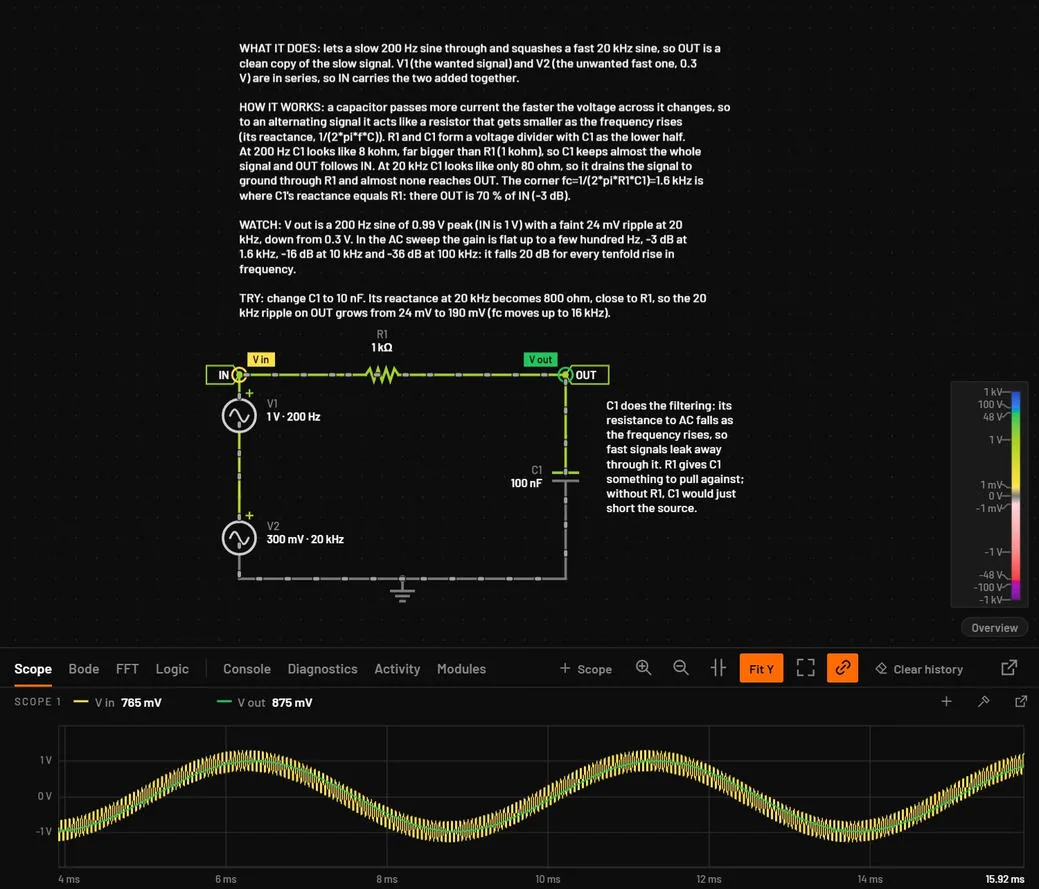
Open a running circuit
- Start BetterSPICE from the Start menu.You should seeA demonstration circuit opens, named Rectifier and LDO · example. The wires are coloured and dots move along them: the circuit is already running.
- Press E.You should seeThe example browser opens.
- Type
rc low, select RC low-pass, 1.6 kHz and press Enter.You should seeA new tab named RC low-pass, 1.6 kHz · example opens. The scope at the bottom shows two traces: V in, a 200 Hz sine with a fast 20 kHz ripple on it, and V out, the same slow sine with almost none of the ripple.If you seepaused in the status bar, press Ctrl+R.
Change a value while it runs
- Click the capacitor C1.You should seeThe inspector on the right shows C1 with Capacitance 100 nF and a slider under it.
- Drag the Capacitance slider to the right.You should seeV out gets smaller and later, and the last of the ripple disappears. The circuit never stops: the change applies at once.
- Press Ctrl+Z.You should seeCapacitance is back to 100 nF. The whole drag was one undo step.
Read the frequency response
- Press F7.You should seeThe example already has an AC setup (V1, 1 Hz to 1 MHz), so the sweep runs at once. The window splits: the schematic on top, the Analysis view below with the Bode plot, flat, then falling 20 dB per decade. The strip above the plot reads −3 dB at 1.59 kHz, which is 1 / (2π × 1 kΩ × 100 nF).If you seethe Simulation setup dialog instead, the circuit has no AC setup yet. Click Run AC sweep in it: the setup is saved, and F7 runs it from then on.
- Press Ctrl+1.You should seeThe schematic fills the window again, still running.
tipWhere next. Draw a circuit of your own in Tutorial 1: Draw an RC filter and watch it run. Look up a job in the task index. If a step didn't work, go to Troubleshooting by symptom.