
Diagnostics and what they mean
BetterSPICE checks the circuit before every solve and while it runs. A problem becomes a diagnostic: a code, a sentence that names the part and the net, and the fix.
E_ codes are errors: the run stops. W_ codes are warnings: it keeps running. Numbers in messages use engineering units, such as 4.7 kΩ or 1.5 µs.
15.1Where diagnostics appear
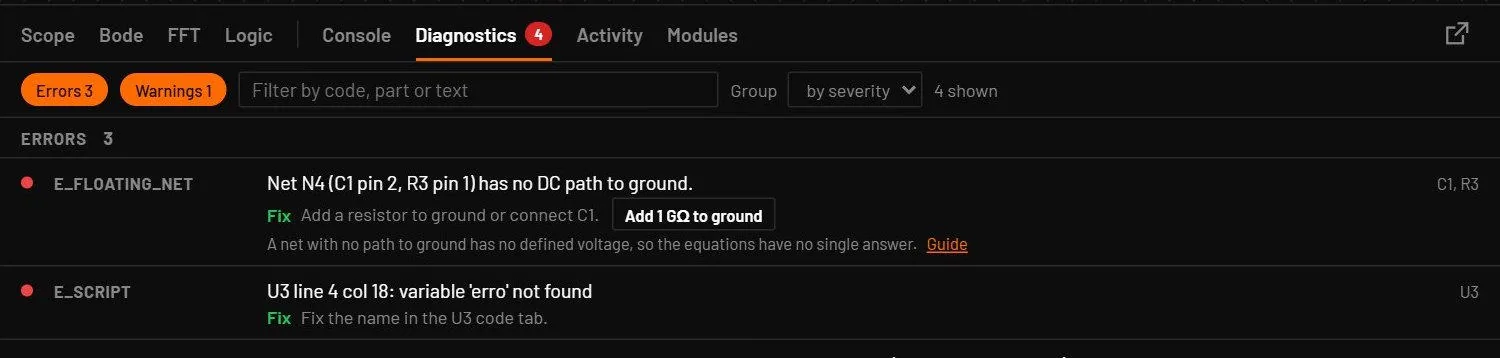
- The Diagnostics tab (Alt+6): one row per diagnostic with a red or amber dot, the code, the message, Fix with the advice, and the parts. Run-time problems add the circuit time.
- The status bar badge: the number of errors (red) and warnings (amber). The badge is red only when there's an error. Open pins are counted once your edits have paused for 1.5 s.
- Markers and tags on the canvas: a red or amber badge at the place of the problem, and short tags in words such as ISO1 tied to GND or Floating net. Hold the pointer over a marker for the text.
- The red Halted button and pill, which open the tab.
- A message at the bottom of the window for the most important ones, such as files that can't be opened.
The tab groups the rows by severity or by part (Group), hides errors or warnings with the two chips, and filters by code, part or text. Each row gives a one-line reason for its code and a Guide link. Long lists draw 100 rows at a time per group with a Show more button.
Click a row or a marker to ring the parts, select the first one and zoom to it. The rows can also be reached with Tab; Enter picks one. Some rows have quick-fix buttons, each one undo step: Add ground for E_NO_GROUND, Add 1 GΩ to ground for E_FLOATING_NET (placed in the first free direction from the net, so it never cuts a wire), Wire it or Delete for E_UNCONNECTED_PIN, and Show the tie and Make it the main ground for W_ISO_TIED. With no problems the tab says "No problems. The circuit passed every pre-solve check." Diagnostics from a failed analysis clear when a later run succeeds.
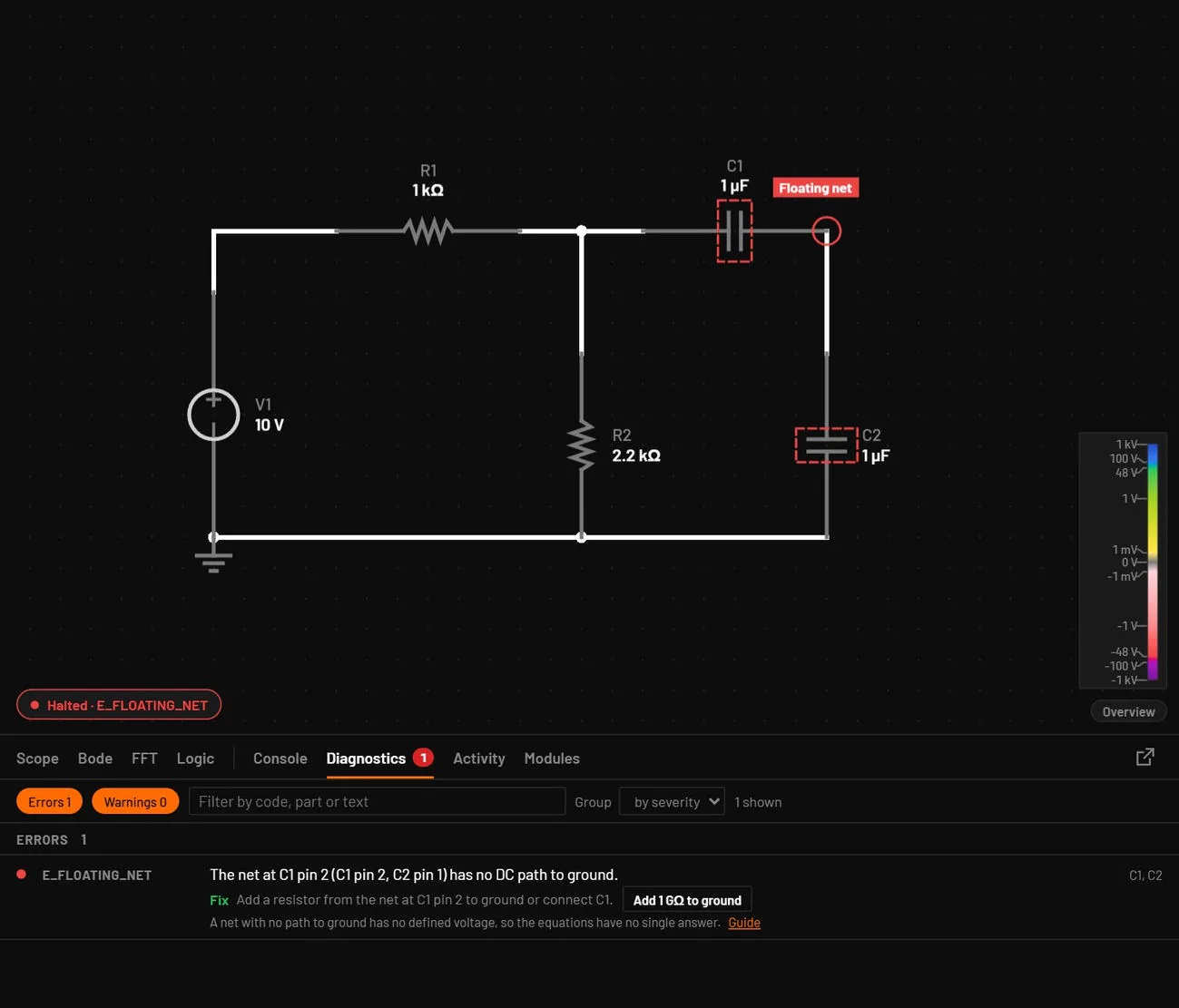
- Place a DC source, a resistor and a capacitor in series to ground, and a second capacitor from the middle to ground.
- Look at the status bar.
- Click the badge, then Add 1 GΩ to ground in the row.
You should seeThe badge turns red with E_FLOATING_NET. Clicking it rings the net and both capacitors. The quick fix adds the resistor and the badge clears.
15.2The codes you meet most
| Code | What it means | What to do |
|---|---|---|
E_NO_GROUND | The circuit has no ground. | Place a ground symbol on the 0 V net. |
E_FLOATING_NET | Net N (pins…) has no DC path to ground. | Add a resistor from the net to ground, or connect the capacitor or gate that isolates it. |
E_VSRC_LOOP | V1 and L1 form a loop of voltage sources and inductors, the current around it is undefined. | Add a series resistor, or give the inductor a small dcr. |
E_NEWTON | Newton iteration did not converge at t = T, largest update in D2 … | Check that part's values and connections, add a series resistor, or lower the maximum timestep. |
E_TIMESTEP | The time step fell below the minimum at t = T, Newton fails at … Or: time advances only … per step. | Add a gate resistor, slow source edges, raise the maximum step or shorten the run. |
E_PARAM | R1 parameter r = 0 is out of range, allowed > 0. Or: is not a number. Also wrong PWL points, unknown power block kinds, bad filter coefficients, LUT tables, state machines, wire sizes, unknown variants, min-max order, unknown logic families. | Set the value inside the range given in the message. |
W_NO_MODEL | X3 has no model: assign one. A Subcircuit / IC or vendor part with no model. Every chip variant has a model (the generic chip is an IC box that only loads its supply, without this warning). | Double-click the part and choose a model, or, for a blank Subcircuit / IC or a generic chip, choose Edit subcircuit and draw the inside. |
E_UNCONNECTED_PIN | R1 pin 2 is not connected to anything. A warning, drawn as a small open dot 1.5 s after the last edit. validate also reports a net label that looks like a slip (VCX beside VCC, the same name in another case) and a part none of whose pins reaches anything. | Wire the pin or delete the part. The Diagnostics row has Wire it and Delete. Correct a mistyped label. |
E_NGSPICE_MISSING | ngspice is not installed or not found. | Reinstall, or set BSPICE_NGSPICE. |
W_NO_SOURCE | Nothing drives the imported circuit. | Place a DC source on the supply net. |
15.3Rejected edits
An edit that would break the circuit, for example a value that's not a number, is refused. It raises E_OP and a message "Edit rejected (user): …". A file that can't be opened or saved raises E_FILE with the reason.
15.4Every code, A to Z
| Code | Group | Message and cause | What to do |
|---|---|---|---|
E_DESKTOP | Files, editing and the app | A failure reported by the desktop app's backend that came without a code, quoted as it was said. | See the message. It names the file or the command. |
E_ENGINE | Files, editing and the app | The WebAssembly engine failed to load, the JavaScript engine runs instead. It runs every part type, more slowly. | Restart the app. |
E_EXPORT | Files, editing and the app | The netlist export failed for a part. | The message gives the fix. |
E_FILE | Files, editing and the app | A file does not exist, cannot be read or written, is a folder, is too large, or is read-only. Also an output that is the circuit itself (export-spice x.bsc -o x.bsc), and an MCP save over a file another session changed. | The message names the file and the reason. Write the output to another file, or open the circuit again with open_circuit. |
E_FLOATING_NET | Circuit structure | Net N (pins…) has no DC path to ground. | Add a resistor from the net to ground, or connect the capacitor or gate that isolates it. |
E_FORMAT | Files, editing and the app | An operating point asked for as CSV. | Use JSON for an operating point. |
E_IMPORT_CHECK | Import | Connectivity differs from the source. | Check those parts by hand. |
E_IMPORT_FORMAT | Import | Not a file the importer reads, a KiCad 5 schematic, or an archive without a schematic. | Export from KiCad 6 or later, or from EasyEDA Pro. |
E_IMPORT_MISSING | Import | A sub-sheet or symbol is missing. | Import the project zip. |
E_IMPORT_PARSE | Import | A syntax error at line and column. | Open and save the file in KiCad again. |
E_INTERNAL | Files, editing and the app | An internal error. | Report it with the circuit file. |
E_ISRC_OPEN | Circuit structure | I1 has no DC path for its current. | Add a resistor from the net to ground or across the source. |
E_MEMORY | Simulate with vendor models | Simulation stopped at the memory limit: the run heads for more points than the limit holds (80 % of the free memory, or --max-memory, maxMemory, BSPICE_MAX_MEMORY). It names the points, the signals and the memory need. On the command line and MCP the run is refused before it starts, in the app a vendor run stops on its way. | Shorten the stop time, raise the maximum step in Setup (F6), or choose Keep less and run again: the probed signals keep every step and the other signals are left out. On the command line --probes does the same, or raise --max-memory. |
E_MODEL (encrypted) | Simulate with vendor models | The model is encrypted for a simulator that cannot run here. | Choose an unencrypted model of the same part. |
E_MODEL (files) | Simulate with vendor models | The model file was not found, is not installed, has no definition of that name, or a pin map points past its pins. validate reports a missing file too, naming the file and where it looked. | Choose the model again in Assign model, or set its file path. |
E_MODEL (pins) | Circuit structure | U1 (opamp) has 4 pins, this type needs 3, 5, 7 or 8. | Place the part again from the library. |
E_MODEL (PSpice) | Simulate with vendor models | PSpice is busy, or reported an error. | Close your own PSpice, or fix the named part. |
E_MODEL (sheets) | Parameters and models | A sheet refers to a file that is not loaded, cannot be read, or nests more than 16 levels. | Put the file next to the parent, or remove the recursion. |
E_MODEL (Simulate only) | Parameters and models | X3 (vendor model …) is accurate-only: it runs in Simulate, and the live simulation leaves its pins open. A warning. | Press Simulate, or give it a behavioural equivalent. |
E_MODEL (two simulators) | Simulate with vendor models | The circuit needs PSpice for some parts and ngspice for others. | Replace one side. |
E_MODEL (type) | Circuit structure | X1 has type t, which the engine does not support. | Replace it with a supported part. |
E_NEWTON | Running | Newton iteration did not converge at t = T, largest update in D2 … | Check that part's values and connections, add a series resistor, or lower the maximum timestep. |
E_NGSPICE | Simulate with vendor models | ngspice failed. Its message is quoted. | Fix the circuit as the message says. |
E_NGSPICE_MISSING | Simulate with vendor models | ngspice is not installed or not found. | Reinstall, or set BSPICE_NGSPICE. |
E_NO_GROUND | Circuit structure | The circuit has no ground. | Place a ground symbol on the 0 V net. |
E_NUMERIC | Running | The voltage of a net or the current of a pin is not a finite number. | Look for parameters near 10308 or 10-308. |
E_OP | Files, editing and the app | Edit rejected (user): … | Check the value and try again. |
E_PARAM | Parameters and models | R1 parameter r = 0 is out of range, allowed > 0. Or: is not a number. Also wrong PWL points, unknown power block kinds, bad filter coefficients, LUT tables, state machines, wire sizes, unknown variants, min-max order, unknown logic families. | Set the value inside the range given in the message. |
E_PARAM (analyses) | Running | Transient stop time, AC source and range, DC sweep source and step problems, too many points, and Simulation cancelled. | The message names the setting. |
E_PARAM (id) | Circuit structure | Two parts have the id R1. | Rename one of them. |
E_PARSE | Parameters and models | The circuit file is not valid .bsc JSON at line L, column C. Also: Unsupported .bsc version: "bsc" is 1.5, expected 1, or a part with no id or a repeated id. | Fix the JSON there. Set "bsc": 1 (1.0 is read as 1). |
E_PART | Files, editing and the app | A part file problem. | Fix the named field. |
E_PART_TODO | Files, editing and the app | A part file field still marked TODO. | Fill in the field. |
E_PSPICE_MISSING (Diagnostics) | Simulate with vendor models | The same, as a warning row: the fitted model was used for the named parts. | The row's fix gives the steps for your system, as above. |
E_PSPICE_MISSING (Simulate) | Simulate with vendor models | Parts with models encrypted by Cadence need PSpice, and PSpice isn't on this computer. The run note names the parts and says their fitted behavioural models were used instead (approximate). | Windows: install PSpice for TI at C:\Cadence\PSpiceTI (or set BSPICE_PSPICE). Linux: install Wine, then PSpice for TI with wine into its prefix (or set BSPICE_PSPICE and BSPICE_WINE), and restart. macOS: not available. |
E_RENDER | Files, editing and the app | A picture could not be made. | The message gives the reason. |
E_REPORT | Files, editing and the app | A report could not be made. | The message gives the reason. |
E_SCRIPT | Control blocks and microcontrollers | U3 line 4 col 18: the Rhai message. Or: the code has no step function. Or: step() exceeded 100 000 operations. For an MCU program: U1 line 3 col 3: FAN is a pwm pin; write FAN = 0.5 for 50 % duty, wait 10 needs a unit, y has no value. | Fix the code at the line and column. The message says what to write. |
E_SCRIPT (warning) | Control blocks and microcontrollers | An output or input channel that does not exist, or an unknown adc_config trigger. | Use a channel the block has. |
E_SINGULAR | Running | The circuit equations are singular at net N: its voltage is not determined. When the net is connected but the resistances span about 30 decades, the message says so: the net is not floating, the matrix is badly conditioned. | Connect the net to ground through a resistor or a source, or bring the extreme resistances closer together. |
E_TIMEOUT | Simulate with vendor models | The run stopped after --timeout (the MCP timeout), vendor runs in ngspice included. bspice ngspice stops after 600 s unless told otherwise. | Give a longer time in seconds, s, min or h (5min, 2h). A bare m is refused, because in SPICE values it means milli. |
E_TIMESTEP | Running | The time step fell below the minimum at t = T, Newton fails at … Or: time advances only … per step. | Add a gate resistor, slow source edges, raise the maximum step or shorten the run. |
E_UNCONNECTED_PIN | Circuit structure | R1 pin 2 is not connected to anything. A warning, drawn as a small open dot 1.5 s after the last edit. validate also reports a net label that looks like a slip (VCX beside VCC, the same name in another case) and a part none of whose pins reaches anything. | Wire the pin or delete the part. The Diagnostics row has Wire it and Delete. Correct a mistyped label. |
E_VSRC_LOOP | Circuit structure | V1 and L1 form a loop of voltage sources and inductors, the current around it is undefined. | Add a series resistor, or give the inductor a small dcr. |
E_VSRC_SHORT | Circuit structure | V1 is shorted: both pins are on one net. | Remove the wire across it. |
W_CONVERGENCE_AIDS | Simulate with vendor models | The convergence doctor: the first try stopped (E_NEWTON, E_SINGULAR or E_TIMESTEP, or in ngspice timestep too small or no DC operating point), so the run was repeated with other settings, and the first one that worked was kept. The warning says in plain words which setting worked, names the part at fault where it can, and gives a sentence on how to run that way from the start. Built-in engine: a patient DC solve, a larger gmin (1 nS, then 100 nS), Gear-2 integration, a ten times smaller maximum step. Simulate with vendor models: Gear integration, a tenth of the maximum step and more iterations, or 1 TΩ shunts for an operating point. As an error: the retry stopped too. | Nothing if the result looks right. When the row has a Fix convergence button, it writes the method, maximum step or gmin into the Simulate setup as one undo step. See Convergence doctor. |
W_CONVERT | Simulate with vendor models | U1: the model name ran with the BetterSPICE conversion (the rule that applied): ngspice cannot run the card as written. A note, drawn on the canvas as a small grey tag, not a warning box. | Nothing to do. docs/MODELS.md lists what the converter rewrites, and Dialects and conversion explains the amber status dot. |
W_DC_CYCLE | Running | Parts keep switching at the DC operating point: the circuit is an oscillator. | Use a transient. |
W_DIODE_ACROSS_SOURCE | Ratings and stress | D1 sits straight across V1: nothing limits its forward current, which reaches 40 A. A diode or LED with both pins on the two pins of a DC source, above 5 A (1 A for an LED). It needs no rating. | Put a resistor in series with the diode, or move it so it does not touch both pins of the source. |
W_EQUIV_STALE | Parameters and models | U1 has a live-view equivalent that the catalog has since refitted (or one the catalog no longer lists). The live view still runs the stored one. A warning, once per circuit. | Simulate is not affected, it runs the vendor model. To take the current equivalent, open the part's Assign model dialog and assign the same model again. To keep the stored one, ignore the warning. |
W_EVENT | Device warnings | F1 blew at 1.20 A (I²t 1.80 A²s), or: F1 tripped at … for a breaker. Reported by a device in the JavaScript live engine, with that device's own words, once, at the moment it happens. | Replace the part (a blown fuse stays open until you do), or reduce the current. |
W_FLOATING_NET | Circuit structure | The same, for a net named like GND or SHIELD, or held only by connectors: it is held at 0 V by gmin. | Usually harmless. Connect it if it matters. |
W_FUSE_BLOWN | Device warnings | F1 blew at t = T (I = …, I²t = …). | Click the fuse to replace it, or raise irated. |
W_GMIN_SHUNT | Running | The operating point needed a small conductance from every net to ground, like ngspice rshunt. The JavaScript fallback keeps this solution too, as the main engine does. | Give open nets a real DC path. |
W_IMPORT_APPROX | Import | A match with low confidence. | Check the part in the Import report. |
W_IMPORT_MODEL | Import | A model file named in the project was not found. | Assign a model from the library. |
W_IMPORT_NET | Import | A net was joined or a supply added. | The Import report lists each. |
W_IMPORT_PIN | Import | A pin was adjusted to match the device. | Check the pin map in the Import report. |
W_IMPORT_UNMATCHED | Import | A part placed as a box. | Assign a model. |
W_IMPORT_VALUE | Import | A value could not be read as written. | Set the value in the inspector. |
W_ISO_TIED | Circuit structure | Isolated ground ISO1 is joined to the main ground, so it is not isolated. Or: isolated grounds ISO1 and ISO2 are joined into one net. The canvas tag reads ISO1 tied to GND. | Click Show the tie to select the joining wires and labels and remove them. Or click Make it the main ground (Name them all ISO1 for two joined domains). |
W_LATCH_BOTH | Device warnings | Both coils of a latching relay are energised, it does not move. | Drive one coil at a time. |
W_LATCH_MARGIN | Device warnings | A latching relay switched on a pulse shorter than its minimum. | Lengthen the pulse. |
W_LEAKAGE_NODE | Circuit structure | Net N (M1 pin d, C1 pin 1) has a conductance of under 100 pS to every other node at the operating point, so its voltage is set by leakage only. A warning after the operating point (also the one before a transient) for a net, or a group of nets, whose small-signal DC conductance to everything else is below 10 GOhm: a hold capacitor behind an off MOSFET, the middle of two back-to-back zeners, an off H-bridge output. Only gmin (1e-12 S) and junction leakage set it, so its value is not a result, and another simulator may give another one. | Add the real leakage (for example 1 GOhm from the net to ground or to the supply) if the value matters. |
W_LIVE_GENERIC | Simulate with vendor models | U1 (vendor model …) runs in the live view as a generic gate or as a fitted equivalent: default thresholds and timing, or a fit to the model's curve; Simulate runs the vendor model. A warning, shown beside the model. | Press Simulate for the vendor model itself, or set the part's equivalent parameters from its datasheet. |
W_LIVE_SETUP | Simulate with vendor models | The Simulation setup asks for Gear or another gmin, and the live view steps with the trapezoidal rule and gmin 1 pS. A note. | Nothing to do. Simulate uses the setup. |
W_MCU_BUS | Control blocks and microcontrollers | U1 bus OLED: SDA has no pull-up resistor, so the transfer fails. Or: no target answered (NACK). Or: a UART framing error. Or: chip select CS floats while the MCU is in reset. Or: nobody acknowledged the CAN frame. | Add 2.2 to 10 kΩ pull-ups on SDA and SCL, check the address and the wiring, use the same baud rate on both UARTs, add a 10 kΩ pull-up on CS, add a second CAN node and 120 Ω terminations. |
W_MCU_PIN | Control blocks and microcontrollers | U1 pin BTN floats: it sits at 1.1 V, between the logic levels, so it reads random values. Or: pin LED sources 40 mA (a pin is rated about 25 mA). Or: pin X drives high but sits at 0.2 V, shorted or fights another output. | Give an input a pull (pin BTN in pullup). Add a series resistor, or drive the load through a transistor. Never join two outputs. |
W_MODEL_RETIRED | Parameters and models | U1: retired: OPA2189 (opamp, TI) was retired from the model catalog: the reason. The live view keeps the values saved in the circuit; Simulate cannot load the model. A warning on the part, drawn on the canvas as Retired model. | Open the part and pick another model in Assign model. The reason says why this one does not run (Retired models). A source checkout lists every retired entry and what was tried in library/broken/index.csv; an install does not carry that file. |
W_NETS_JOINED | Circuit structure | A wire you drew joined the nets VIN and VOUT into one net. A warning shown after you draw the wire. | Undo the wire if it was a slip. Wires you draw go exactly where you draw them, so the warning is the only sign that two named nets are now one. |
W_NGSPICE | Simulate with vendor models | A warning from ngspice, quoted. | Read it. It usually names the model or the option. |
W_NO_MODEL | Parameters and models | X3 has no model: assign one. A Subcircuit / IC or vendor part with no model. Every chip variant has a model (the generic chip is an IC box that only loads its supply, without this warning). | Double-click the part and choose a model, or, for a blank Subcircuit / IC or a generic chip, choose Edit subcircuit and draw the inside. |
W_NO_SOURCE | Import | Nothing drives the imported circuit. | Place a DC source on the supply net. |
W_OVER_CURRENT | Ratings and stress | L1 carries 3.4 A, over its 2 A current rating. Also a diode's forward current and a transistor's maximum current. The value is a peak. | Use a part rated above the current, or add series resistance. |
W_OVER_POWER | Ratings and stress | R3 dissipates 1.2 W, over its 250 mW power rating. Also a potentiometer, a Zener diode or a transistor against its maximum power. In a transient the power is the average over 1 % of the run, so a spike shorter than that does not count. | Use a part rated for more power, or lower the voltage or current. A part with no rating is never warned about. |
W_OVER_VOLTAGE | Ratings and stress | C1 sees 28 V, over its 25 V voltage rating. Also a polarised capacitor driven backwards, a diode's reverse voltage and a transistor's maximum voltage. The value is a peak. | Use a part rated above the voltage, or lower it. Turn a polarised capacitor around. |
W_PARAM | Parameters and models | V2: rise 1 µs + width 9 µs + fall 1 µs = 11 µs is longer than the period 10 µs; each pulse is cut off … Or: a PWL source whose Repeat from time is not before its last point, so the points play once. Or: an op-amp whose gain, gbw and slew do not fit together: held to its slew spec, the input stage would saturate so early that the output could never pass 5 V (a gain of 100 with a gbw of 100 MHz and the default slew). The engine lets the output reach the supply, so the part slews faster than its slew spec. Or: a diode with a depletion capacitance whose vj falls below zero at its temp (a Schottky-like 0.35 V at 147 °C); the engine keeps the potential at 10 mV and warns, where ngspice returns NaN and stops. Each value is valid alone, but together they do not do what was written. | Follow the fix in the message: for a pulse, "Make V2 width at most 8 µs (period − rise − fall), or the period at least 11 µs". For a PWL source, set Repeat from to a time before the last point, or untick Repeat the points. For a diode, raise vj or lower temp. For an op-amp, raise slew (gain × slew ÷ (2π × gbw) is the largest output swing) or the gain. |
W_PART | Files, editing and the app | A part file warning, such as a value outside its usual range. | Check the named field. |
W_PART_SHORTED | Circuit structure | R1 has both pins on net N: a wire runs across it, so it does nothing. A warning for a resistor, capacitor, diode or LED whose two pins are on one net other than ground (a part dropped on a wire, or a wire drawn over it); a voltage source in that spot is E_VSRC_SHORT. | Remove the wire across the part or move one of its pins. |
W_PSPICE | Simulate with vendor models | A warning from PSpice, quoted. | Read it. |
W_PSPICE_TRACES | Simulate with vendor models | PSpice for TI keeps at most 4 traces per run. | Probe the signals you need. |
W_RATING | Device warnings | K1 contact current 12 A exceeds imax = 10 A. Also coil voltage, motor stall, battery cut-off, power, energy and voltage ratings. | Reduce the stress or choose a part with a higher rating. |
W_SAVE_PROBES | Simulate with vendor models | A long run kept only the probed signals. | Click a net to add its trace, or shorten the run. |
W_SUPPLY | Device warnings | U1 supply is 1.2 V, below its minimum 2 V. | Power the part within its range. |
W_SYMBOL_ONLY | Parameters and models | A part the engine has no model for is left unconnected and the rest runs. | Replace it with a simulated part, or keep it for the drawing. |
W_TIMING | Device warnings | U1: a write arrived while the display controller was busy, so it was ignored. A warning for a part driven faster than its datasheet timing allows (an HD44780 write while its busy flag is set, instruction times 37 µs, clear and home 1.52 ms). | Wait for the busy flag to clear, or lengthen the delay between writes in the program. |
W_TRAP_GEAR | Simulate with vendor models | Trapezoidal ringing detected at 9.97 ns (first in D1): switched to Gear for 4 steps. It happened 4772 times: 16695 Gear steps in all, 2.3 % of the steps. A note, tagged Gear where it rang, not a warning: the engine saw a stiff node reverse at every step and damped it by itself. | Nothing to do. To run Gear throughout, set the Integration method to Gear in (F6). |
W_TRAP_RINGING | Simulate with vendor models | V(SW) changes direction at each of 138 time points in a row (4.2 µs to 7.9 µs, 5.1 V peak to peak): every second point is high and the next one low, an alternation with a period of two time steps (92 ns). That is numerical oscillation from the trapezoidal integration rule, not ringing in the real circuit: the rule does not damp a fast, stiff node (a hard-switched MOSFET or diode), and the period of the oscillation is set by the time step, not by any L or C of the circuit. ngspice's trapezoidal rule oscillates the same way. It spoils the trace and the peak values read at that node, not the averages of the signals (in the 39 example circuits that raise it, the time mean of every signal moved by under 0.2 % of its range in 35, and by 0.35 % to 6.5 % in the other 4: two free-running oscillators, a flyback and a kickback clamp). In Simulate with ngspice the run was repeated with Gear integration. | Set the Integration method to Gear or Backward Euler in (F6); the built-in engine runs both as backward Euler. To tell it from real ringing, run once with Gear or Backward Euler: a numerical oscillation is gone, a real ring is still there, only damped. A damped method can also stop a real oscillator from starting (the joule-thief example does not oscillate in Backward Euler), so check that the circuit still does what it did. A real ring that the steps resolve is smooth over several points per cycle and is never flagged. Lowering the maximum step changes the oscillation only when that step sets the point spacing (the solver's own error control often does). A real ring as fast as the warning (a stray L and C ringing at a few steps per cycle) looks the same at a coarse step: set the maximum step to a tenth of its period to see it. Adding damping to the circuit is not the fix. |
W_UART | Control blocks and microcontrollers | UB: framing error on RXD (the stop bit is low): the sender's baud rate differs from 9600 baud, or RXD is not a UART signal. Or: more than 4096 bytes are waiting to be sent; the rest were dropped. | Set the USB-UART bridge's baud to the sender's rate, and check that RXD is wired to a TX pin. Send less text at a time, or raise the baud rate. |