
Simulate (F5) and its engines
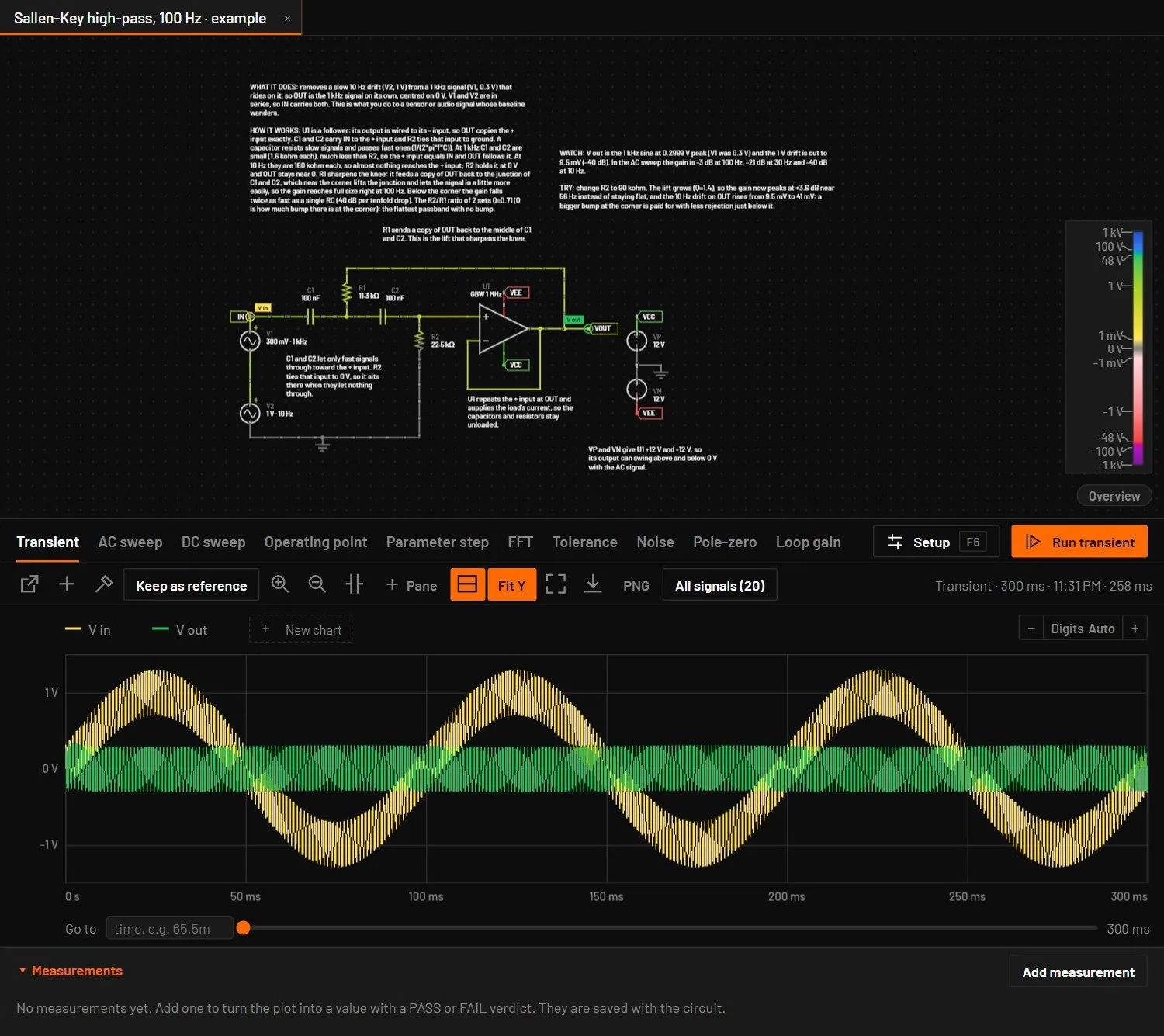
Simulate runs a transient from t = 0 to the stop time in the toolbar and plots your probes in the Analysis view. BetterSPICE picks the engine, so you never choose one.
27.1Running Simulate
- Set Simulate for (the stop time, default 200 ms) and max step (the largest timestep, Auto unless you type one) in the toolbar.
- Place probes on the signals you want to see.
- Press F5 or click Simulate. From the Schematic view the window splits so the schematic stays visible. In Split and Analysis it stays as it is.
- While it runs, the Simulate button shows the percentage, the seconds so far and Cancel, and the Analysis view a progress bar. Click either to cancel.
- When it finishes, the plot shows your probes. In Split, hold Alt and click a net or a part on the schematic to add more traces.
27.2Which engine runs
| The circuit contains | Desktop app | Browser |
|---|---|---|
| Only built-in parts and discrete vendor models (diodes, BJTs, MOSFETs, JFETs) | The BetterSPICE engine | The BetterSPICE engine in WebAssembly |
| Vendor subcircuit models (op-amps, regulators, current-sense amplifiers, references) | ngspice-47 with the vendor's own files. The progress line says in ngspice (vendor models). | Not available. A banner says the circuit needs the desktop app. |
| Cadence-encrypted vendor models | PSpice for TI, hidden. The progress line says in PSpice (encrypted vendor models). | Not available. |
You never choose the engine. A circuit is sent to ngspice when it has a part with a vendor model file, and to PSpice when one of those files is Cadence-encrypted. Everything else stays in the BetterSPICE engine, which is faster. Logic parts (gates, flip-flops, latches and the counter) are written into those ngspice runs as well, so a circuit that mixes them with vendor models runs whole, and a gate or flip-flop output switches at the moment its input crosses the threshold, not up to a step later. A transient starts exactly at the operating point, also with JFETs, capacitors and inductors.
27.3What the plot shows
- Your probes, named as on the schematic. A circuit without probes shows "No probes: press P and click a net, or Alt+click a net/part in Split view to add a trace", not every node at once.
- In Split view, Alt+click a net (voltage) or a two-pin part (current) on the schematic to add its trace. It stays until you remove it. A plain click selects and edits as usual.
- A run that has warnings of its own, such as F1 blew at t = 1 ms for a fuse, shows them in the note under the result, unless Diagnostics already lists them.
- All signals in the plot toolbar shows every node voltage and branch current the run kept, with a signal list beside the plot.
- Placing or deleting a probe while a result is shown updates the plot at once. It re-reads the result, or reruns when the last run took less than two seconds.
27.4Progress, cancel and errors
- A run never fails silently. A run that takes more than a moment shows its progress.
- Pressing F5 during a run says "A simulation is already running (N s, P %). Press Cancel to stop it, then Simulate again."
- A failed run shows a red banner, Simulation failed: with the reason, which stays until you press Dismiss.
- A run in the browser's built-in engine can't be cancelled halfway. It says so and stops by itself at the stop time.
- Results belong to the circuit they ran on. Opening another circuit clears them, and a run in flight on a changed circuit is discarded with a message.
- Some vendor op-amp and current-sense models have no DC operating point at 0 V. If ngspice finds none, BetterSPICE runs the transient again from 0 V with every capacitor discharged, as at power-up. A warning tells you it did this. The run doesn't fail.
- When ngspice finds the DC point only through its transient fallback, Simulate runs Newton iteration again from that state with every node set, so a TI macromodel such as the OPA2990 lands on the point PSpice gives. Transients, DC sweeps and AC analyses start from that point.
- A switching circuit with no DC point, such as the UC3843 boost and SEPIC examples, never settles. The search then stops after a short power-up and the run starts from 0 V with a warning. The search never stops a run for memory: a helper run over the memory limit is skipped.
- The bar names the step: Step 5 of 6: Simulating in ngspice until the engine is done, then Wrapping up.
27.5Threads
sets how many processor cores simulations may use: Auto (the default) or a fixed number. Auto uses every core but one, so the window stays responsive while a run goes on. The choice is remembered on this computer. The status bar always shows what may run side by side, for example Steps and tolerance 16 threads, and after a run it says what that run used: Last run 1 thread (a transient goes step by step), or Last run 5 threads after a parameter step. Hold the pointer over it for the setting and the reason.
| Run | Threads it uses |
|---|---|
| Simulate, a transient, AC or DC sweep, an operating point | One for the steps, because each time step depends on the one before. A big circuit, whose device load takes more than about 9 µs a step, evaluates its parts on up to 4 threads and adds their contributions in the same order as one thread, so the result is the same to the last bit. A typical circuit stays on one thread: its step takes a few microseconds, less than it costs to hand work to another thread. |
| Parameter step of a circuit without vendor models | One worker per value, up to the setting (Auto: all cores but two, because the live simulation keeps one). |
| Parameter step of a circuit with vendor models (desktop app) | Its ngspice runs go side by side, up to the setting. Each extra run goes to a hidden ngspice worker process. Circuits that need PSpice still take turns. |
| ngspice device models | BSIM3 and BSIM4 MOSFET models are evaluated on up to the setting’s threads inside ngspice. Other models run on one. |
Results don't depend on the setting: a run on one thread and on many gives the same numbers, in the same order. From 0.5.0 every exp, log, power and sine of the engine comes from one correctly rounded math library, in the desktop app, the command line and the live view alike, so a circuit also gives the same numbers on Windows, Linux and macOS. Processors with AVX2 and FMA take a faster path that gives the same bits. Set Threads to 1 to keep the other cores free for something else, for example a long build.
bspice command takes --threads auto or --threads N, and the variable BSPICE_THREADS sets the same thing. bspice verify runs its circuits side by side and prints, for example, "Simulated on 23 threads (144 circuits in 0.9 s)" (Conventions).27.6Auto maximum step
Leave max step empty, or type auto, and Simulate picks the step from the circuit. The step is the smallest of these, rounded down to a short number such as 1, 2, 5 or 8 times a power of ten:
- a fiftieth of the period of each source (sine, square, pulse, function generator, or the switching frequency of a block),
- a fifth of a slow edge of a source: the rise or fall of a pulse, or a ramp of a piecewise-linear source. A step that ends inside a slow ramp lets a transistor switch off too fast and lift its collector above the supply. An edge so short that it would need more than 50 000 steps is left to the solver, which crosses it from corner to corner as a sharp edge,
- a fiftieth of the PWM period that the code of a microcontroller or control block sets (
pwm 25kHz,pwm(0, 20000.0, d)), like a source, - a twentieth of an RC time constant, for a capacitor and a resistor that share a net that can move,
- a fiftieth of an LC period, where the windings of a transformer count as inductors,
- a twentieth of the L/R time constant of a resistor in series with an inductor,
- a 25th of the period of the ring that an inductor makes with the capacitance of the diodes and transistors on its net, which the parts put there themselves (the coil of a relay with the drain capacitance of its MOSFET). The trapezoidal rule reads a ring slow by (2π/N)² / 12 for N points per period, 0.5 % at 25 points. A ring that 50 000 steps would resolve with fewer than 10 points is left alone, because a capped step reads it no better and costs time,
- a thousandth of the stop time.
Time constants, edges and rings are estimates, so they never ask for more than 50 000 steps over the stop time. A source’s own period is what the circuit is driven at, so it goes down to a ten-millionth of the stop time. When a limit holds the step back, the reason says limited to 50,000 steps over the stop time, and the notice before a long run names what set an Auto step in one muted line. The Transient setup then says Auto, from the circuit: 8 µs with the reason, for example 50 points per period of V2's 100 kHz source, and the toolbar field reads Auto 50 µs. A value you type still wins, and with one typed the setup says how to go back. Auto is not written into the circuit file, and a file that has a saved step keeps it. Every analysis uses the resolved step, and so do the pre-run estimate, the long-run notice and an AI agent's run_analysis.
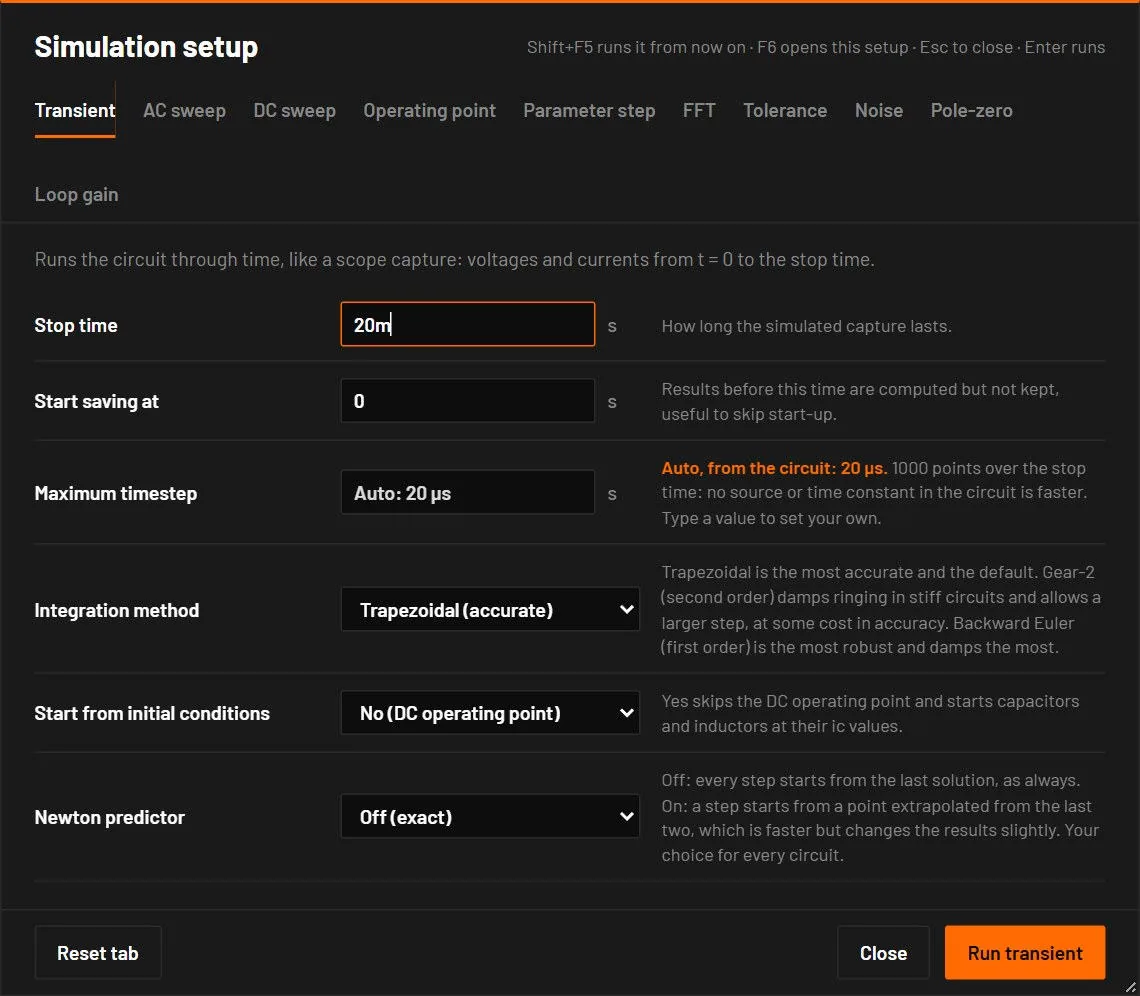
- Vendor models. A run that goes through ngspice counts only the limits from sources, PWM and the stop time, because ngspice chooses its own internal steps and a guessed limit made a vendor model fail that ran at 1 µs.
- When an Auto run fails in ngspice, Simulate repeats it at 2 µs in a fresh ngspice process and a note (
W_AUTO_STEP_FALLBACK) says so. The retry gives the same answer as typing 2 µs yourself. - A ring that reads slow. The inductive-load flyback example rang at 38.7 kHz at the stop time divided by 1000, where the part values give 41.1 kHz. With the ring rule the step is 800 ns and the ring reads 40.95 kHz.
The old fixed step of 1 µs was wrong both ways. A Colpitts oscillator read 951.6 kHz where 997 kHz is right, and a 14 Hz astable took 400 000 steps. Auto reads the Colpitts at 997.7 kHz and runs the astable in about a twentieth of the time.
27.7Start-up kick for oscillators
Some oscillators sit exactly balanced in a simulation and never start, where a real one starts from noise. When a transient of a circuit with something that has gain and something that stores energy sits still, BetterSPICE repeats it with a 5 µV pulse on one input of the part with gain. If that run oscillates, the Analysis view offers it, once per circuit:
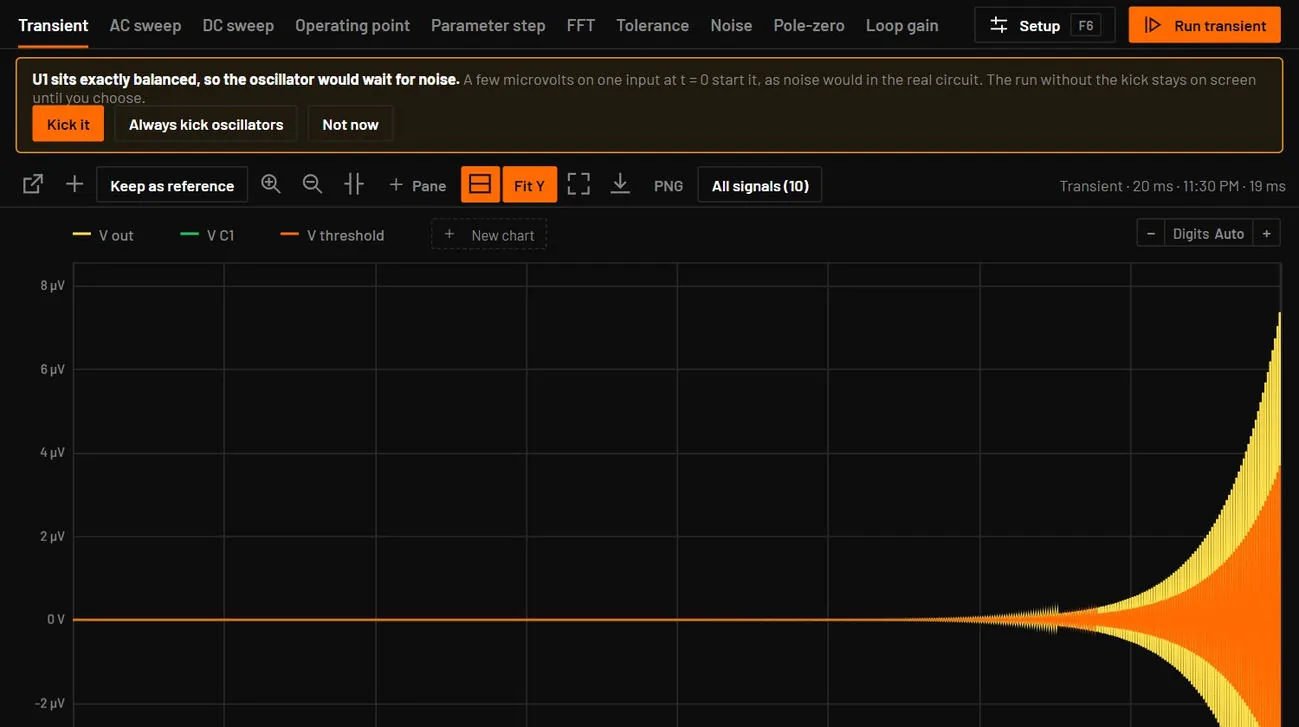
- Kick it shows the kicked run at once. Its note says Started with a 5 µV kick on U1's input at t = 0, because the circuit sat exactly balanced. Your circuit file is never changed.
- Always kick oscillators kicks every balanced oscillator from now on, and says so in a message. It is saved on this computer, and turns it off.
- Not now hides the offer for this circuit.
- asks for a kick directly, without waiting for an offer.
A run that already starts is never changed, and a circuit where the kick dies away, such as a stable follower, shows nothing. The live view is not kicked, only Simulate runs.
27.8Integration method and long runs
The Transient tab has an Integration method. Trapezoidal is the default and keeps the most detail. Gear-2 is a variable-step second order method that damps ringing in stiff circuits. Backward Euler is first order and the most robust, and it damps real ringing too. The choice is saved in the circuit as method.
Trapezoidal ringing guard. The trapezoidal rule does not damp a very fast mode, such as a junction capacitance across a conducting junction or a switch node that drives an inductor: the value reverses direction at every step and only the step size hides it. The engine watches every charge and flux. When one reverses three steps in a row, the next four steps use Gear-2 and the trapezoidal rule resumes, with no restart. A signal that the steps resolve never does this, and a growing oscillation, such as an oscillator starting up, is left alone. There is nothing to set. A run set to Gear or backward Euler is not watched. When the guard acted, the run carries a note, W_TRAP_GEAR, tagged Gear where it rang, that says when it first happened, how many times and what share of the steps it took. It is a note and not a fault, and it needs nothing from you. To run Gear throughout, set the method to Gear in the setup. In the live view the note goes out once, at the first window. On an interleaved buck at a 20 ns step the guard removes a 26 mV limit cycle that the plain rule had, and the cost is a few percent more steps.
Before a long or data-heavy transient starts, the Analysis view says how long it will take and how much data it holds, with Run, Keep less when it holds more than 240 MB, a faster Gear setting that names its step, or Cancel. The estimate comes from the stop time, the maximum step and the measured cost of a step: the speed of this circuit's last Simulate run, else a guess from the live view, which then reads Up to about. Run keeps every signal at every step, gigabytes too, and the notice says when that needs more memory than is free now. Keep less keeps the probes at every step and every other signal as the lowest and highest value of short time slices. While a run goes, the bar shows the percentage and the time left. The time left is projected from the speed of the last seconds of the run (the last quarter of the run so far, at least 3 s) and follows the run. A run that slows down, as a switching circuit does once its start-up is over, says at least, because the end can be slower again. A run that turns out to take longer than 30 seconds shows the same figure in a notice during it, with the two buttons below.
Vendor-model runs (ngspice). ngspice adds a point at every switching edge, so a switching circuit makes far more points than its stop time over its maximum step: the mains flyback example makes about 4.95 million where its setup gives 90,000. Before the first run of such a circuit the notice counts at least that many steps. While the run goes, from 3 % of the way on, the Analysis view says where it is heading when that is big: the points, the result size, the memory it needs and the limit, 80 % of the memory free when the run started. The points are projected from the recent progress, and said as at least while each part of the run makes more points than the part before. Stop and keep less stops it and runs it again with only the probed signals, each at every step. Keep going lets it run. A run heading over the limit stops by itself with E_MEMORY and keeps nothing, in a box with the ways out: a shorter stop time, a larger maximum step, or Keep less and run again. The next run of the circuit counts with the points the last one made, so its notice gives the real size. Keep less in ngspice keeps only the probed signals, so a circuit with no probe is told to add one first. Nothing is thinned unless you choose Keep less.
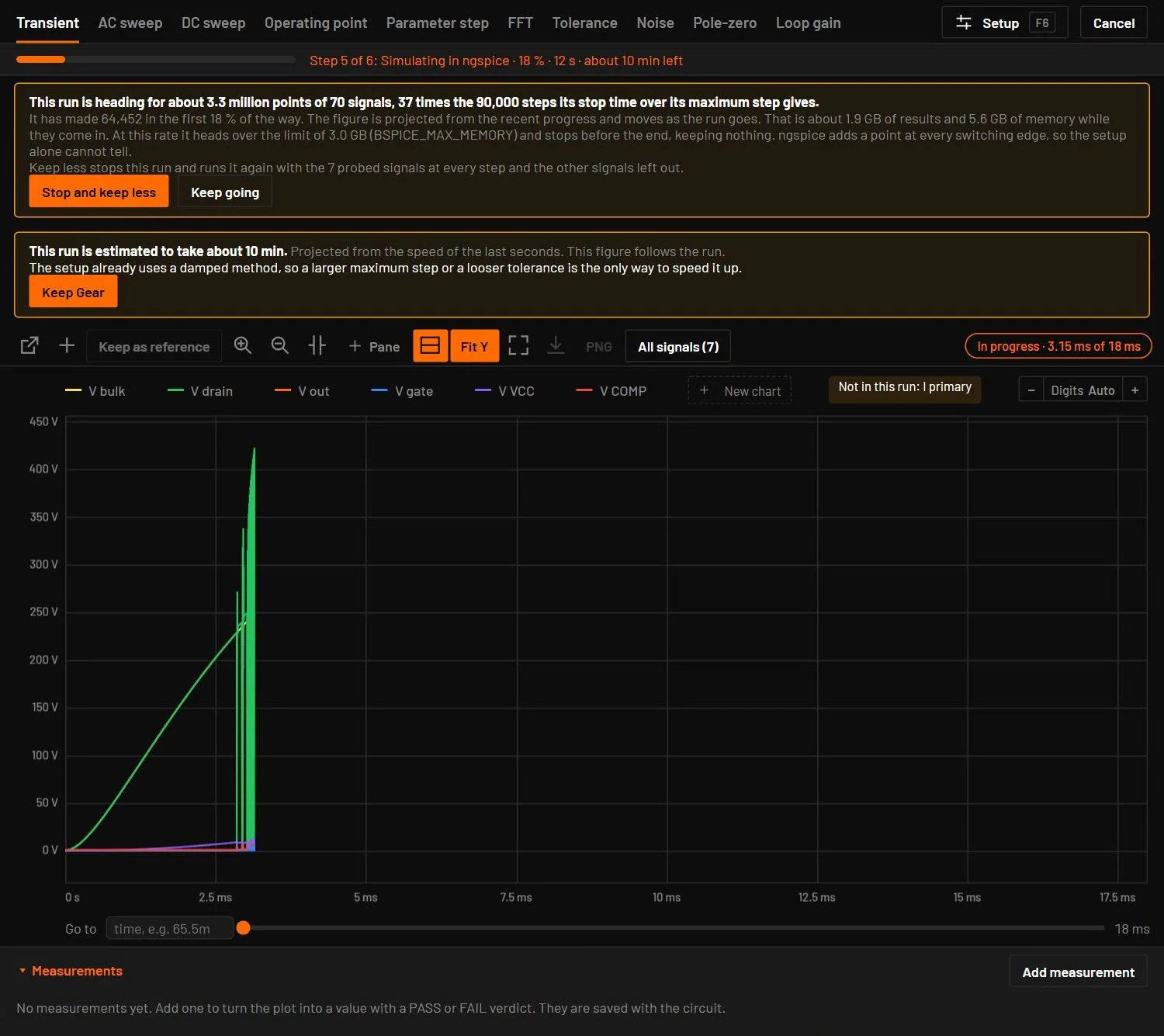
The run so far. While a long Simulate transient goes in the desktop app, the Analysis view draws the waveform so far, about once a second, with an In progress chip that gives the time reached out of the stop time. The picture is thinned to short slices that keep the lowest and highest value, so a spike still shows. Export CSV and PNG wait, and the full result replaces it when the run ends.
When the estimate passes 30 seconds, the notice gives a faster choice: Gear-2 with a maximum step four times larger. It takes up to four times fewer steps where the maximum step sets them, but a switching circuit takes most of its steps at its edges, and those stay, so the notice promises no time. It also states the two drawbacks of that choice.
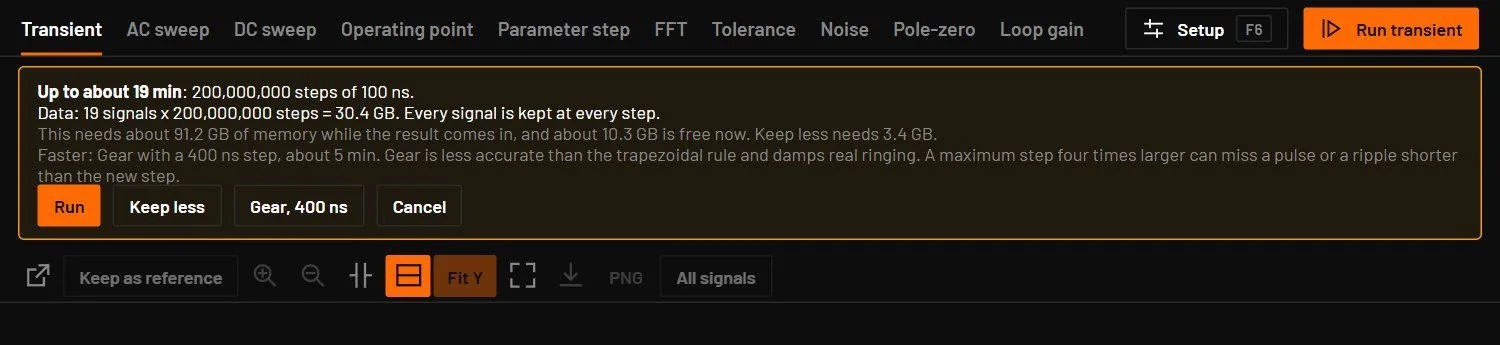
- Switch to Gear and 400 ns (the button names the new step) writes the setup, says so in a message, cancels the run and runs again.
- Keep trapezoidal changes nothing, and the next long run shows the notice again.
- Nothing switches without the click.
27.9Convergence doctor
When a run stops because the solver did not converge (E_NEWTON, E_SINGULAR or E_TIMESTEP), the engine tries again by itself and stops at the first setting that works. The order is a slower, finer DC solve with more Newton iterations, a larger gmin (1 nS, then 100 nS), Gear-2 integration, a maximum step ten times smaller, and the last two together with gmin. For an operating point only the first three apply. The result is the run that worked, and a W_CONVERGENCE_AIDS row says in plain words which setting worked, names the part at fault where it can, and gives a sentence on how to fix it (a switch that flips in no voltage range, a source edge of zero time, an ideal source on a gate).
- When the setting can be saved, the row has a Fix convergence button. It writes the method, the maximum step or gmin into the Simulate setup as one undo step.
- A run that converges the first time is never touched and takes the same steps as before.
- In the live view the same ladder runs on a step that fails, and the settings it found stay on until you reset.
- For vendor models Simulate has its own retry with ngspice's aids, reported with the same code.
- An agent reads the row with
get_diags. It carriesapply, for example{"method": "gear", "maxStep": 2e-7}, which can be written tosim.simulate.
27.10Ratings and stress warnings
A part that carries a rating and runs over it gets a warning, a red pulse on the canvas and a row in the Diagnostics tab, with no need to open the inspector. The codes are W_OVER_POWER, W_OVER_VOLTAGE and W_OVER_CURRENT. W_DIODE_ACROSS_SOURCE needs no rating: a diode or LED across both pins of a DC source, carrying more than 5 A (1 A for an LED), has nothing to limit its current. A part with no rating is never warned about. In a transient the power is the average over 1 % of the run and voltage and current are peaks. The live view keeps a warning for 2.5 s after the last frame that went over, so a pulsed load does not flicker. Diagnostics and what they mean lists the codes.
27.11Settings saved in the circuit
A circuit file can carry the Simulate settings it needs in sim.simulate. The Transient tab opens with them, and Simulate applies them:
| Key | Example | What it does |
|---|---|---|
stop, maxStep | 0.075, 1e-6 | The stop time and largest timestep, as in the toolbar. |
method | "gear" | The integration method: trap, gear or be. |
uic | true | Start from initial conditions (a power-up from 0 V). A circuit that sets it always starts this way, even when the Transient tab says no. |
options | "rshunt=1e10 abstol=1e-9" | ngspice options the circuit needs, added as an .options line. Only name=value words pass, so a file can't add other commands to the run. |
Use options for models that need a looser tolerance. The op-amp macromodels from TI, for example, can stall ngspice with "timestep too small" when their output reaches a rail, and abstol=1e-9 cures that without changing the results.
27.12ngspice and vendor models
When a part has a vendor model, Simulate writes a netlist with the vendor's own .lib or .sub file included, the pin map from the symbol to the model, and the analysis. Models written for PSpice, LTspice or HSPICE are converted to ngspice syntax first where needed. Dialects and conversion describes what is converted.
- Several vendor libraries in one circuit. Vendor macromodels reuse helper names with other contents: two TI op-amps both have a
VNSE_0with their own noise figures. Each library gets a namespace of its own. A.subckt,.model,.paramor.functhat an earlier library or the circuit defines differently is renamed in that library's lines only, and a comment in the netlist lists the renames. A circuit with one vendor model gets the same netlist as before.bspice export-spicewrites the netlist Simulate runs. - Library sections.
.lib "file" SECTIONreads only that section of the file, as ngspice and HSPICE do. - LTspice OTAs and flip-flops follow LTspice: the source and sink current limits (
Isrc,Isink, a defaultIoutof 10 µA),PowerUpandIoffset. In an SR or D flip-flop, reset wins over set. - PSpice LAPLACE blocks take the coefficients each instance sets, and a leading denominator coefficient of 0 runs the lower-order transfer function, as PSpice does. ngspice has no LAPLACE source, so the conversion runs from the start.
- PSpice voltage-controlled switches keep their off resistance: a 1 TΩ ROFF stays 1 TΩ. Before 0.8.0 it ran as 17.6 MΩ, which made the clamps of TI op-amps leak.
- Op-amp pins by name. An op-amp model whose pin names give each of in+, in-, out, V+ and V- once is placed by those names, so the MAX4091 buffers as it should.
- Gear from the start. The mains flyback and the boost PFC examples run Gear from the start, because their trapezoidal run always rang and was run again with Gear.
27.13PSpice for encrypted models
About 18 000 models in the catalogue are encrypted by Cadence, mostly Texas Instruments parts. ngspice can't read them, but PSpice for TI can. When the circuit contains one and PSpice for TI is installed, Simulate runs the whole circuit in PSpice, hidden, and reads the result back.
| Limit | Why | What to do |
|---|---|---|
| One run at a time | PSpice for TI runs one simulation per Windows session. | Wait for a run to finish, or close your own PSpice window, before pressing Simulate. |
| At most four probed signals | The free PSpice for TI keeps at most four traces. | Probe the four signals you need. The run repeats with the ones you choose. The full Cadence PSpice has no such limit (point BSPICE_PSPICE to it). |
| Desktop only | PSpice is a Windows program. | Use the desktop app. |
| Approximate live simulation | The live simulation uses parameters fitted in PSpice. | Use Simulate for numbers you rely on. |
PSpice takes the first definition of a subcircuit name for every instance. When two libraries of the circuit define a subcircuit of the same name (OPAMP3A is in four encrypted TI files), the later part is called through a small wrapper library, so each part gets its own model. Library rows for these models say "Cadence-encrypted, verified in PSpice". If PSpice isn't installed, the run stops with a message that names PSpice for TI and where to get it.
27.14Simulate and the live simulation
| Live simulation | Simulate | |
|---|---|---|
| Purpose | Watch the circuit while you design | A result you can measure, for a fixed stop time |
| Timestep | Fixed by the circuit, kept small | Adaptive, never above max step |
| Agreement | The same engine: the first step is Simulate's, and at the same step the frames are the same bit for bit | The reference |
| Vendor subcircuits | Fitted behavioural models | The vendor's own files in ngspice or PSpice |
| Output | Colours, dots, readings, scope | The Analysis view: plots, cursors, CSV, PNG |