
04
Tutorial 3: A regulator with a vendor model
Real chips come with the manufacturer's own SPICE model. You'll open a ready-made linear regulator, give its op-amp a Texas Instruments model, and run that model in ngspice with Simulate. About ten minutes. Desktop app only.
You needThe desktop app with ngspice 47 ready in the status bar.
You will learnAssigning a vendor model, what the live simulation does with it, and how to read the output and its ripple from a Simulate run.
04.1Open the regulator
- Press E, type
op-amp series, select Op-amp series regulator (LM317 principle) and press Enter.You should seeA 12 V supply with 1 V of 100 Hz ripple feeds transistor Q1. Op-amp U1 compares the divided output (FB) with a 1.25 V reference and holds V out at 5 V. The scope shows V in, V out and V FB.
04.2Give the op-amp a vendor model
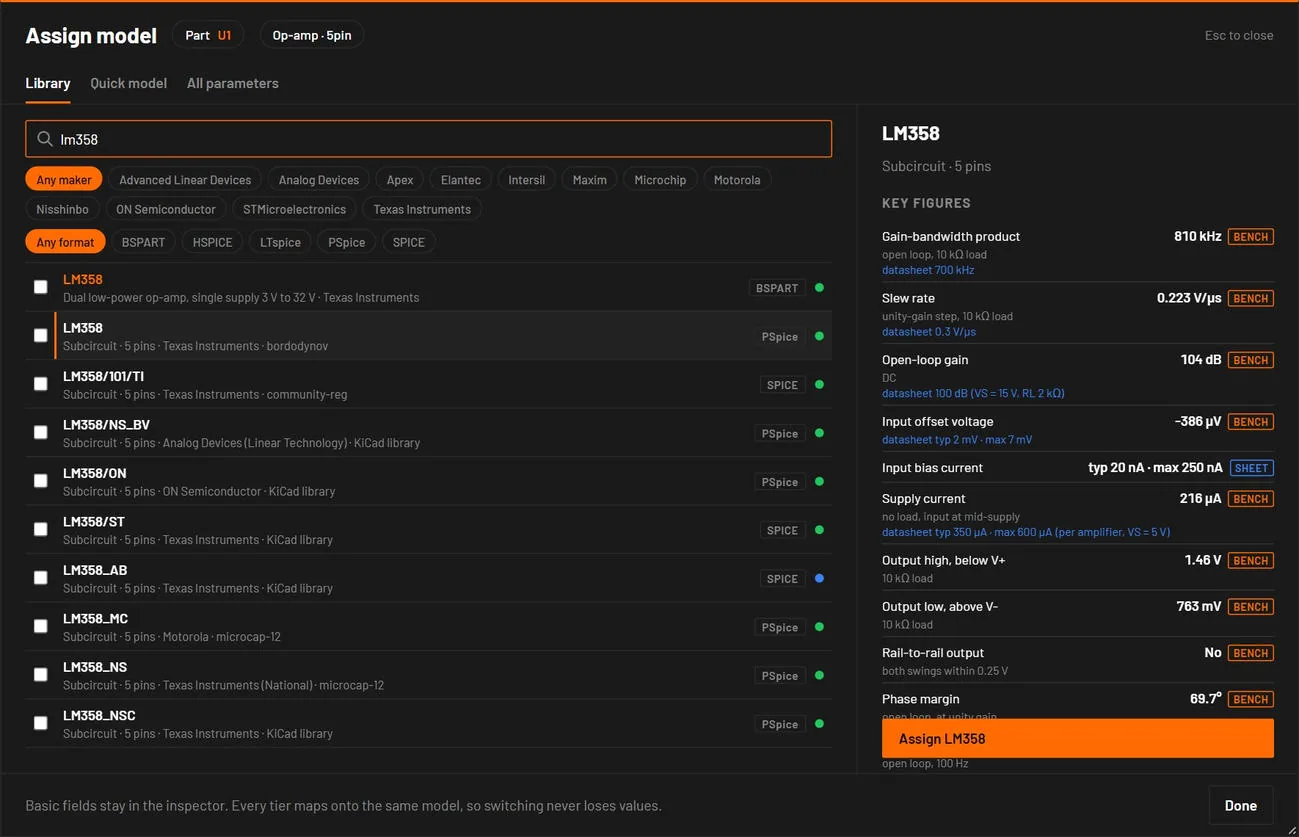
- Double-click U1.You should seeThe model dialog opens on the Library tab, listing op-amp models.
- Type
lm358in the search box.You should seeLM358 rows from several libraries. The first, marked BSPART, is a BetterSPICE part file. The others are vendor SPICE models. - Click the row LM358 · Subcircuit · 5 pins · Texas Instruments, format SPICE.You should seeThe preview on the right shows the maker, the pins and the Live view line: the live simulation uses a model fitted to TI's, and Simulate runs TI's file itself.
- Click Assign LM358.You should seeA message says "LM358 assigned to U1". The inspector header for U1 now names LM358.If you seea warning that the pins don't match, choose another LM358 row with five pins, or place the LM358 from the library instead.
04.3Run it with the vendor's model
- Press F5.You should seeThe progress line says in ngspice (vendor models). After a few seconds the Analysis view shows the three probes over 100 ms.
- Read V out.You should seeV out sits at 5.00 V from the first instant, because a transient starts from the DC operating point, while V in swings between 11 V and 13 V.
- Drag a box around V out to zoom in on it.You should seeA ripple of about 0.26 mV peak to peak at 100 Hz, against 2 V peak to peak at the input: the loop gain of the op-amp removes about 78 dB of it.
noteLive and Simulate differ here. The live simulation runs a model fitted to the LM358, and its ripple is far smaller, about a microvolt: the fit doesn't carry the finite power-supply rejection of TI's model. The Simulate result comes from TI's own file. When to trust which result says which to use for what.
tipSee the start-up. Press F6, set Start from initial conditions to Yes: start from the ic values, and run again. The run then starts from 0 V and shows the output rising.
If your screen does not match
| If you see | Do this |
|---|---|
ngspice not found, and a banner with E_NGSPICE_MISSING | Reinstall BetterSPICE, or point BSPICE_NGSPICE to ngspice.dll (Environment variables and files). |
| "timestep too small" in the banner | The model stalled at a rail. Settings saved in the circuit shows the abstol=1e-9 option that cures it. |
| The run takes a long time | Vendor models are slower than built-in parts. The progress bar shows how far it has got. Cancel stops it. |
04.4What you did
You replaced a generic op-amp with a manufacturer's model, and BetterSPICE chose ngspice to run it without being asked. The same steps work for regulators, references and current-sense amplifiers: Choose the model a part uses.